
前端监控.md 6.0 KB
title: 前端监控 tags:
- 监控 categories:
- 前端 date: 2020-06-05 17:52:00 ---
背景
其实老早就想做监控,之前整理的{% post_link 前端埋点(一) %}里头有说一些相关的内容。
不痛就不慌,所以说说我们痛的地方:
- 因为我们的产品都是部署在客户内网的,所以对于debug及其不友好,客户现场问题排查前端几乎没有任何输入,难弄。
- 产品迭代了多个版本,但是没有任何客户现场的用户行为等数据,产品优化少了一些输入。
本来计划是自研,但是由于业务压力突然来袭,所以就搁置了,不过我犹不放弃,觉得自研既然短期不现实,那可以站在巨人肩膀上搞一搞。
找了两个工具Sentry+rrweb,基于两个工具做一些定制化,手里不就有东西了吗。
Sentry
Sentry的应用程序监视平台可为每位开发人员提供帮助诊断,修复和优化其代码的性能。
package
@sentry/tracing 性能监控
# Using npm
$ npm install --save @sentry/react @sentry/tracing
config
Sentry.init({
  dsn: 'http://cb4e9b434f004c53a51af8ab45346635@172.17.162.101:9100/2',
  integrations: [new Integrations.BrowserTracing()],//性能监控配置
  // beforeSend (event, hint) {
  //   // Check if it is an exception, and if so, show the report dialog 错误弹窗
  //   if (event.exception) {
  //     Sentry.showReportDialog({ eventId: event.event_id });
  //   }
  //   return event;
  // },
  debug: false,// 调试模式
  attachStacktrace: false,//附上堆栈信息
  tracesSampleRate: 1,// Be sure to lower this in production
  environment: 'development',
  // logLevel: 2,
  release: 'sentryTest-0.1.0'
});
// 创建一个 全局scope ,可以理解为上报数据的附加信息
Sentry.configureScope((scope) => {
 //标签,可用于筛选
 scope.setTag("first-tag", "Guide");
 //绑定用户信息
 scope.setUser({
  id: 1,
  name: "gamehu",
  email: "gamehu@yeah.net",
 });
});
//局部:自定义上下文,补充信息
    Sentry.setContext("zhangsan", {
      name: "zhangsan",
      age: 19,
      attack_type: "zhangsan",
    });
    // 创建一个零时到 scope ,配置到 context 上面
    const scope = new Sentry.Scope();
    scope.setTag("section", "articles");
    scope.setUser({
      id: 2,
      name: "zhangsan",
      email: "zhangsan@yeah.net",
    });
sourceMap
sentry-cli releases -o 组织 -p 项目 files staging@1.0.1 upload-sourcemaps js文件所在目录 --url-prefix 线上资源URI
sentry-cli releases files sentryTest-0.1.0 upload-sourcemaps --url-prefix 'http://172.17.162.101:9100/organizations/sentry/issues/61/?project=2&query=is%3Aunresolved' './dist/static/js'
添加一个 EventProcessor 对全局生效
const attachmentUrlFromDsn = (dsn, eventId) => {
  const { host, path, projectId, port, protocol, user } = dsn;
  return `${protocol}://${host}${port !== '' ? `:${port}` : ''}${path !== '' ? `/${path}` : ''
    }/api/${projectId}/events/${eventId}/attachments/?sentry_key=${user}&sentry_version=7&sentry_client=custom-javascript`;
}

//添加一个 EventProcessor 对全局生效
Sentry.addGlobalEventProcessor((event) => {
  try {
    const client = Sentry.getCurrentHub().getClient();
    const endpoint = attachmentUrlFromDsn(
      client.getDsn(),
      event.event_id
    );
    const formData = new FormData();
    const data = JSON.stringify({ logEntries: ["sentryTest"], message: event.message, logger: event.logger });
    formData.append(
      'my-attachment',
      new Blob([data], {
        type: 'application/json',
      }),
      event.event_id + '.json'
    );
    fetch(endpoint, {
      method: 'POST',
      body: formData,
    }).catch((ex) => {
      // we have to catch this otherwise it throws an infinite loop in Sentry
      console.error(ex);
    });
    return event;
  } catch (ex) {
    console.error(ex);
  }
});
RRWEB/TimeCat
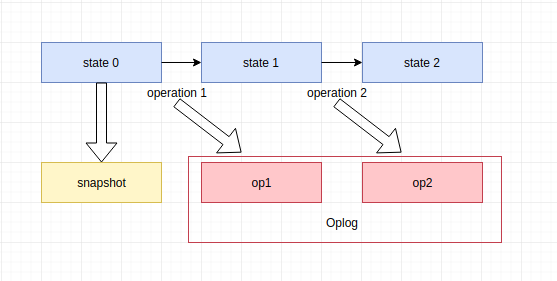
录制回放工具,可单独使用也可搭配Sentry使用,可对用户操作录屏,针对一些现场问题可作为排查问题得输入.
监控理论的记录
要做监控先做设计,根据产品、研发、测试等的输入,整理出监控数据类别:
- JS 的异常错误;
- 资源测速;
- 接口的成功率、失败率;
- 性能。
{% blockquote FEX-zhangjunah http://fex.baidu.com/blog/2014/05/front_end-data/ 前端数据之美 -- 基础篇 %} {% endblockquote %}
{% blockquote FEX-zhangtao https://fex.baidu.com/blog/2014/05/build-performance-monitor-in-7-days/ 7 天打造前端性能监控系统 %} {% endblockquote %}
{% blockquote 何方舟-前端之巅 https://mp.weixin.qq.com/s/aqO55IyVCZzh9yhKuOKSCQ 前端越管越宽,腾讯Now直播如何把监控体系做到极致? %} {% endblockquote %}
{% blockquote LDP https://tldp.org/LDP/abs/html/exitcodes.html Advanced Bash-Scripting Guide %} {% endblockquote %}
本文引用的内容,如有侵权请联系我删除,给您带来的不便我很抱歉。